Transactions Journal Report
The Transactions Journal report allows users to view a list of charges posted to each account by a cashier.
Perform the following steps to generate the report:
Navigate to Reports ➜ Dynamic Reports ➜ Accounting ➜ Transactions Journal Report.
Refer to the following table and fill in the fields.
|
Field |
Description |
|---|---|
|
Report Name |
Transactions Journal. |
|
Property |
This is a mandatory multi-select drop-down list that allows users to select the properties for report generation. |
|
Start Date |
The start date for report generation. This is a mandatory field that allows users to select past, present, or future dates. |
|
End Date |
The end date for report generation. This is a mandatory field that allows users to select past, present, or future dates. |
|
Account Type |
This is an optional multi-select drop-down list that allows users to select from the following account types:
|
|
Transaction Type |
This is an optional multi-select drop-down list that allows users to select from the following transaction types to be included in the report:
|
|
Transaction Items |
This is optional multi-select drop-down list that allows users to select from the active transaction items available at the property. |
|
Inventory Items |
This is optional multi-select drop-down list that allows users to select from the active inventory items available at the property. |
|
Payment Methods |
This is optional multi-select drop-down list that allows users to select from the active payment methods available at the property |
Click Run to generate the report.
Click Save to save the report under User Favorites section.
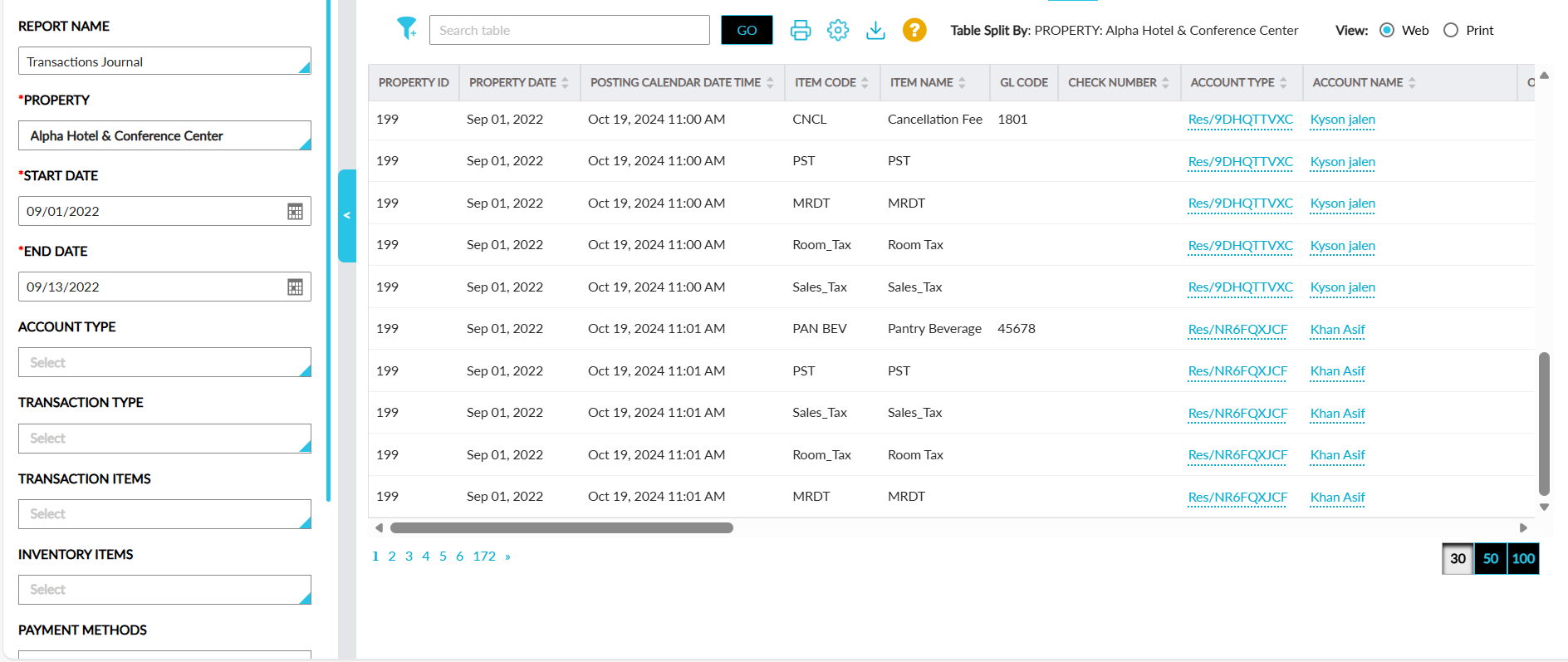
Sample Report
Report Fields
This report displays the following fields:
|
Field |
Description |
|---|---|
|
Property ID |
The property ID of the property. |
|
Property Date |
The current property date of the property. This column can be sorted. |
|
Posting Calendar Date Time |
The calendar date and time when the item was posted. This column can be sorted and filtered. |
|
Item Code |
The item code of the posted item. This column can be sorted and filtered. |
|
Item Name |
The name of the posted item. This column can be sorted and filtered. |
|
GL Code |
The GL code of the posted item. This column can be sorted and filtered. |
|
Reference Number |
The reference number of the transaction. |
|
Check Number |
The check number of the check payments posted from a POS system. This column is left blank when there are no check payments posted from a POS system. This column can be sorted and filtered. |
|
Account Type |
The account type of the account to which the item was posted displayed as a hyperlink. When clicked, users are navigated to the respective account. This column can be sorted and filtered. |
|
Account Name |
The account name of the account to which the item was posted displayed as a hyperlink. When clicked, users are navigated to the respective account. This column can be sorted and filtered. |
|
Outlet |
The outlet through which the item was posted. This column can be sorted. |
|
Meal |
The meal period associated with the selected outlet. This column can be sorted. |
|
Cashier |
The name of the cashier who performed the transaction. This column can be sorted. |
|
Transaction Type |
The type of transaction performed. This column can be sorted. |
|
Quantity |
The quantity of items posted. |
|
Total Amount |
The total amount of the items posted. This column can be sorted. |
|
Account |
The name of the account in which the transaction was performed. This column can be sorted. |
|
Comment/Resolution Reason |
|
|
Transfer From Account |
The name of the account from which the charges were transferred. This column can be sorted. |
|
Transfer From Account Type |
The account type of the account from which the charges were transferred. This column can be sorted. |
|
Transfer To Account |
The name of the account to which the charges were transferred. This column can be sorted. |
|
Transfer To Account Type |
The account type of the account to which the charges were transferred. This column can be sorted. |
|
Tax |
The tax amount associated with the posted item. This column can be sorted. |
|
Transfer Direction |
Indicates the direction of the transfer. This column can be sorted. |
|
Issuer |
The issuer type of the credit card payment method used for the transaction. This column can be sorted and filtered. |
|
Last Four Digits |
The last four digits of the credit card payment method used. This column can be sorted and filtered. |
|
Card Subtype |
The card subtype configured for the credit card payment method used. This column can be sorted and filtered. |